


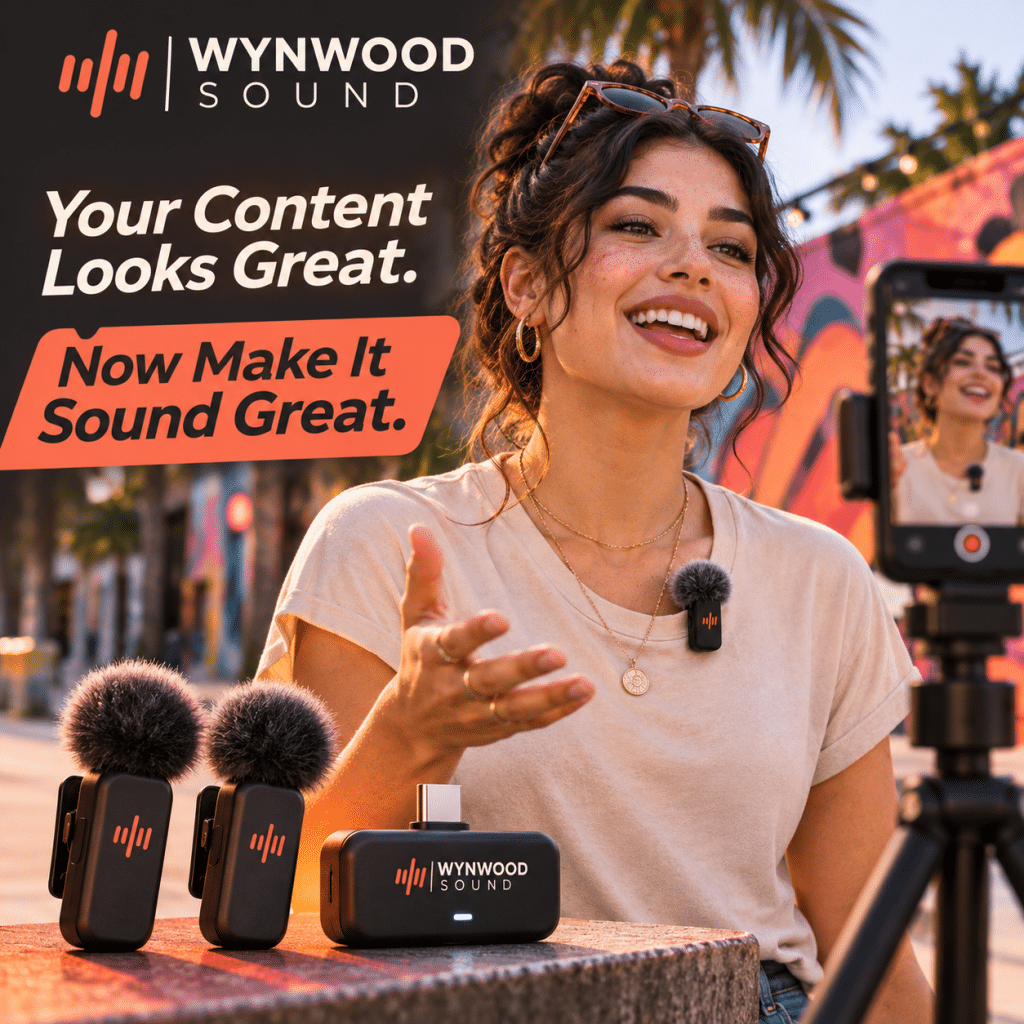
For creators recording on a phone or camera, audio gear can add as much setup as it removes. Wynwood Sound’s Wynwood Sound CreatorMic is designed as a compact wireless microphone system that brings several parts of that workflow together: a wearable transmitter, a receiver with connections for different devices, onboard sound processing and a way to monitor audio with USB-C headphones. The product is aimed at vlogging, video recording, interviews and podcast-style speech captured away from a studio.
The central idea is to keep the microphone small and the adjustments close at hand. CreatorMic has a magnetic clip that rotates through 360 degrees, three selectable EQ modes, noise and echo reduction, and a limiter intended to control sudden loud sounds. Rather than treating the mic as a bare transmitter that depends on later editing, Wynwood Sound describes it as a system with processing configured for speech-oriented creation. The useful question for prospective users is therefore not simply whether it is wireless, but how its physical design, controls and connections fit into a recording routine.
A wearable mic designed for flexible placement
CreatorMic’s removable magnetic clip is intended to let the microphone be attached and repositioned at different angles. The product page presents this as a way to mount it discreetly on clothing or elsewhere, rather than relying on one fixed clip orientation. A rotating mount can be useful when a creator changes the position of the transmitter to suit a shot, outfit or recording setup; the source describes 360-degree positioning but does not specify a single best placement for every situation.
Wynwood Sound emphasizes the system’s small physical footprint, describing CreatorMic as less than one-third the size and weight of typical professional microphones. That comparison is the company’s claim, rather than a standardized measurement supplied alongside named comparison products. The page also notes that the microphone has no visible logo and uses low-visibility LEDs. Those choices speak to the visual side of recording: the brand says the mic is intended not to draw attention in a video, where equipment can become part of the frame.
The mic is also presented for movement and outdoor use. Its page says the magnetic clip is designed to stay in place during activities such as running or jumping, and the system includes wind screens that attach for outdoor recording. The screens are described as helping block wind noise. They are also framed for close-up use, where a barrier over the microphone can be useful. The material does not promise that they will eliminate wind or other environmental sound in every setting.
Processing intended to make speech easier to manage
CreatorMic’s audio features are built around a dual-capsule design. Wynwood Sound explains that both capsules pick up the speaker’s voice, while off-axis noise and room echo are louder in one capsule than the other. The system can use that difference to identify and reduce unwanted sound. This is the company’s account of how its intelligent noise and echo removal works; the supplied product information does not give a measured reduction figure or describe performance across particular rooms.
For voice shaping, CreatorMic offers three EQ modes: flat, a podcast-style proximity effect, and a low-cut setting intended to remove rumble. The product page says users can cycle through EQ and noise-reduction modes with a click of the top button on the microphone. Keeping these settings on the mic makes them part of the recording process rather than a choice that has to wait for editing software. The flat mode provides the listed neutral option; the other two are described in terms of vocal presence and low-frequency rumble.
A built-in limiter is intended to prevent distortion when the input suddenly gets loud, with the page naming shouts and coughs as examples. The listed maximum sound-pressure level is 110 dB, and Wynwood Sound says the mic can record up to nightclub sound levels. That specification gives a reference point for the product’s stated handling of loud environments, but it should not be mistaken for a promise that every recording in a noisy venue will be clean: the source does not provide a full test method or environmental conditions.
The manufacturer also describes CreatorMic as a way to reduce editing effort by processing audio during capture. That positioning may matter to creators who want to make basic voice adjustments before recording rather than apply them later. It does not mean that every recording will need no post-production. Instead, the controls provide several starting points on the device: choose an EQ mode, use the noise-reduction options, and rely on the limiter for abrupt level peaks.
Connections and monitoring across different recording devices
The system is marketed for iPhone, iPad, Android devices, computers and digital cameras. Wynwood Sound says its receiver can connect to iPhones, Android smartphones, Macs, PCs, DSLR cameras and DJI action cameras. The listed package includes Lightning, USB-C and 3.5 mm DSLR camera cables, and the receiver is described as universal. It can also mount to cold-shoe brackets, according to the product page. These options are intended to let one microphone system serve more than one kind of recording device rather than requiring a separate audio setup for each platform.
Compatibility depends in practice on the device and the connection being used, so the included cable types are important details to check against a particular setup. The source page identifies the supported categories and included connector types, but it does not enumerate every device model or operating-system version. Creators planning to use a specific camera or phone can use those listed connections as a starting point for verifying fit before recording.
Another practical feature is live monitoring. The product page says USB-C earbuds or headphones can connect through CreatorMic’s charging port, which then serves as an audio output. This allows a user to listen to the mic signal during recording without a separate monitoring accessory, according to the company. The same page says a USB-C headphone adapter can be used. Since monitoring depends on the appropriate headphone or adapter connection, it is a useful part of the system to consider when choosing how to capture and check sound.
CreatorMic can also handle two microphone signals in more than one way. Wynwood Sound says users can blend the signals together or keep them on separate channels. That choice can support different recording arrangements: a combined signal may be convenient when a single mixed track is wanted, while separate channels preserve the distinction between the two mic signals. The source does not detail the software steps for every recording device, so the exact workflow may depend on the connected equipment.
Wireless operation, battery and physical controls
The system uses 2.4 GHz wireless transmission, with a stated range of 30 metres or 100 feet. Range figures describe the manufacturer’s specification, not a guarantee that the same distance will be available in every location. Obstacles and the surrounding radio environment are not discussed in the supplied material, so creators working at the edge of that stated range should treat it as a guide rather than a certainty.
Wynwood Sound lists about five hours of battery life under most circumstances and says recharging can take less than an hour. The product information also says the microphones or receiver can be powered from a battery pack if needed. This gives users two forms of planning information: an approximate operating period on the built-in charge and an external-power option for a longer session. The company separately presents CreatorMic Plus, which includes a battery case and is described as offering up to 48 hours of recording. That is a different product configuration, not the battery-life figure for the standard CreatorMic system.
Controls are kept simple in the description: a top button cycles through EQ and noise-reduction modes, while a quick tap-to-mute function is listed among the features. For creators moving between takes or speaking live, a physical mute control can be easier to reach than a software setting, though the source does not explain how mute status is displayed beyond noting low-visibility LEDs. The combination of on-device mode selection and a mute function reflects the product’s emphasis on adjustments that can be made at the microphone.
What the package is intended to cover
The CreatorMic page describes the product as a complete solution and lists the transmitter system, receiver, connection cables, wind screens and a travel case. The case is intended to keep the components organized and protected in transit. The listed cable set covers Lightning, USB-C and 3.5 mm DSLR camera connections, while the wind screens address outdoor or close-microphone use. Taken together, these accessories are meant to reduce the need to assemble a separate set of adapters and basic microphone accessories before a recording session.
The store also lists a two-year unconditional guarantee for its microphones. Its FAQ says that if something goes wrong with the microphones or receiver, the company will replace them at no charge. This is Wynwood Sound’s stated warranty commitment; readers should consult the current terms directly for any details not included in the supplied page text. The site also advertises free returns and free shipping within the United States, but those are store policies rather than technical features of CreatorMic.
For a creator deciding how to organize a portable audio kit, CreatorMic is best understood through the workflow its maker describes: attach the small transmitter where it can capture the speaker, select a voice treatment, connect the receiver to the recording device, and monitor through USB-C headphones if desired. Its distinguishing details are the rotating magnetic mount, dual-capsule processing, three EQ choices, limiter, multiple connection types and the option to combine or separate two mic signals. Those features make the product relevant to phone-first video, camera recording and mobile interviews, while the practical fit still depends on the user’s equipment, preferred placement and recording conditions.
Get all details about Wynwood Sound
Sponsored by Gabal Global Group, with publishing tools from CheapPlugins.