


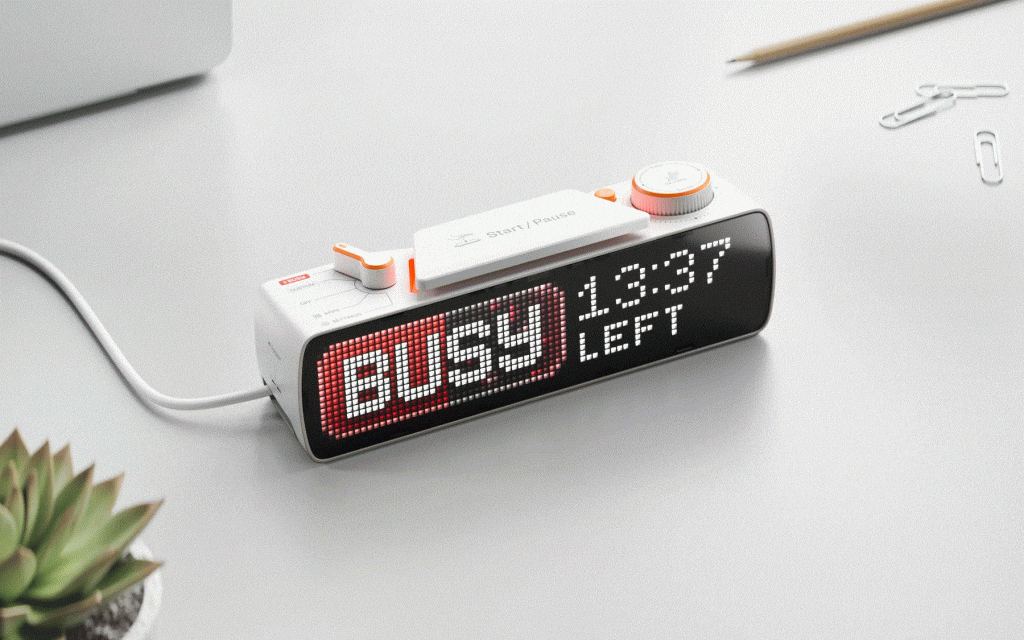
Busy’s Busy BUSY Bar is a desk or room-side device designed to make availability visible while bringing several focus tools into one interface. Its 72-by-16 RGB LED matrix can show a busy message, a timer, custom designs, pixel art, or animations. Physical controls let someone start a status, set its duration, and move through built-in modes without having to reach for a computer or phone. The product’s central idea is practical coordination: communicate that you are concentrating, indicate when you expect to be free, and connect that status to software or home-automation actions.
That makes BUSY Bar more than a sign with a timer, but less like a standalone productivity system that works in exactly the same way in every setup. Some functions can be used directly on the device, while notification management and app blocking depend on the BUSY App integration. Other capabilities are aimed at developers and smart-home users, through local APIs, network connections, and automation support. Understanding those layers helps explain what the device does, how it can fit into a work routine, and where software or configuration is involved.
A status display built for shared spaces
The most immediate function is a visible status message. BUSY Bar can display that its user is busy and, when a timer is set, when that status is due to end. The device can sit on top of a desktop monitor using its built-in monitor mount, or be placed elsewhere with the included wall mount. That placement makes the screen useful not only to the person working at the computer, but also to people approaching a desk, office, or door.
Status can be activated manually with the large Start/Pause button. The product page says this basic operation works offline and does not require additional software. A scroll wheel sets an optional expiration time, allowing the display to communicate an expected return to availability instead of showing an open-ended busy signal. There are also physical controls for changing modes and navigating menus, so the device does not need to be connected to a PC or mobile app for manual operation.
Users can select a status design from a library or create a custom one. The product pages describe the display as supporting text, images, pixel art, animations, and timers, with 16 million colors on the main RGB screen. A secondary monochrome OLED screen mirrors the main display and is intended to make the status readable to the person controlling the device even when the main screen faces away. A light sensor adjusts display brightness to the surrounding environment, according to the specifications.
Focus sessions combine timing and interruption management
BUSY Bar includes an interval focus timer inspired by the Pomodoro technique. The site describes the familiar pattern of 25 minutes of work followed by a five-minute break, while also describing the timer as configurable for simple or interval sessions. The scroll wheel is used to set time in Busy and Pomodoro modes. In practice, the timer gives the displayed status a defined duration, linking a personal work interval with an outward-facing signal about availability.
The product’s distraction-blocking features add a software layer to that routine. When BUSY mode is activated, the BUSY App can mute notifications on a phone and computer, and the site says the app can manage distractions across a computer, phone, and smartwatch. Users can select apps to block during a focus session; the pages specifically mention Instagram and TikTok as examples. The stated behavior is that selected apps cannot be opened until the timer ends, and notifications from those apps are stopped during the session.
These features should be distinguished from the device’s basic display and manual controls. The source identifies BUSY App integration as necessary for blocking notifications and apps, and describes the app as available for free. The pages also say there is no subscription required for the cross-device distraction-management offering. An optional “Hardcore mode,” described as locking apps for the duration of a session with no bypass other than a full phone reset, is marked as coming soon. It is therefore not presented as a currently available capability in the supplied material.
The product also describes automatic status activation based on activity. Its examples include turning on an ON CALL message when a computer microphone is active, enabling a streaming status when streaming software such as OBS is being used, and responding when a selected program is active. The pages list microphone, camera, or app activity as possible triggers. These automations can reduce the need to remember to switch the display manually, though the supplied information does not specify compatibility with every conferencing, recording, or streaming application.
Controls and connections serve different kinds of use
The on-device controls are designed to make common actions available without a separate interface. Alongside the Start/Pause button, BUSY Bar has a five-position selector for switching between modes, a scroll encoder that also works as a push button, and a Back button for leaving menus or apps. The pages describe the large buttons as easy to operate without looking at the device. A speaker provides sound alerts and notifications, and two RGB status lights indicate the active mode.
For computer and network access, BUSY Bar offers several routes. It can connect over Wi-Fi, use a USB-C connection to a computer, or connect to a cloud service. The USB connection can create a Virtual LAN interface, making the local web interface and HTTP API accessible without Wi-Fi or internet. On a local Wi-Fi network, the pages say that the HTTP API, web interface, and Matter smart-home protocol can be used even when the device has no internet access. Remote control over the internet is also described, including changing the display remotely or automating updates, but that involves connecting the device to the BUSY App account or another cloud setup.
The product pages list macOS support for the desktop software and say Windows support is coming soon. BUSY Bar also has mobile apps for iOS and Android, along with a web interface. These details matter because the device’s capabilities are not all delivered by the same connection: direct manual control can work offline, local integrations can use a LAN or USB connection, and remote access uses a cloud connection. The source also describes an offline API, giving developers a way to work with the device without relying on an internet service.
Smart-home use and developer access
BUSY Bar can connect its status to smart-home actions. The site gives examples such as pausing music, turning on lights, or locking a door when the user is busy. It identifies Matter support and compatibility with Apple Home and Google Home as part of this direction. The same pages state that the company is a member of the Connectivity Standards Alliance and that its products are in the process of being certified to work with the Matter standard. That qualification is important: the material describes the intended standard support while also making clear that certification is in progress.
Home Assistant is another integration route. According to the product information, BUSY Bar can be integrated natively through its HTTP API. It can function as an automation trigger when the user becomes busy, and it can also serve as an output device—for example, displaying a message when a washing machine has finished a cycle. These examples illustrate two directions for automation: the device can report a status to a broader system, or receive an event from that system and present it on the display.
Developers can use the open HTTP API to send text and images from scripts, applications, or smart-home systems. The site lists libraries for TypeScript and Python, as well as an SDK for building and loading custom apps. It also says the firmware is open source, published on GitHub under GPLv2, and that the shipped code can be audited, built from source, or forked. The site describes the firmware as written in C on the FBT toolkit, with documented tools for extending the device. Taken together, the API, libraries, and firmware access position BUSY Bar as a small programmable display as well as a consumer productivity device.
Hardware details and practical boundaries
The listed hardware includes a 6.35-inch, 72-by-16-pixel RGB LED main display with a 60 Hz refresh rate, plus a 1.54-inch monochrome OLED back display at 160 by 80 pixels. The device uses a 3,250 mAh lithium-ion 18650 battery, and the specifications state eight hours of active status. USB-C is used for charging and PC connectivity. The wireless processor supports 2.4 GHz Wi-Fi 6 and Bluetooth Low Energy 5.4, while the main processor is an STMicroelectronics STM32U5-series chip. A light sensor, speaker, and physical controls round out the listed components.
Those specifications describe the platform, but they do not mean that every feature is automatic or universally available without setup. App blocking requires BUSY App integration; remote operation requires a network or cloud path; and smart-home behavior depends on connections and compatible systems. The product materials give examples and supported interfaces, rather than a complete compatibility list for every app, computer, phone, or connected-home device. They also distinguish current features from items marked as forthcoming, including Windows support and Hardcore mode.
Viewed as a whole, BUSY Bar is organized around a useful sequence: set or trigger a focus status, make that status legible to people nearby, give the session a time boundary, and optionally coordinate software or smart-home behavior around it. Its appeal is therefore not only the LED display, but the choice between straightforward physical control and deeper integration. Someone who wants a prominent busy signal can use the manual controls, while a developer or automation-minded user can explore its API, local networking, and open firmware. The source pages present those as related uses of the same device, with the BUSY App providing the additional layer for cross-device notification and app management.
Sponsored by Gabal Global Group, with publishing tools from CheapPlugins.